How it works
Sozuri connects to WhatsApp through Meta's official WhatsApp Business Platform (the Cloud API). You keep your WhatsApp Business account in your own Meta Business portfolio, and you connect it to Sozuri by pasting four values, the way you would paste a key from any other provider. Sozuri never takes the number away from you.
The whole setup is six steps. The first four are done once; after that you only write templates and send.
- Choose the WhatsApp plan on Sozuri.
- Prepare WhatsApp in Meta and copy four values.
- Connect your number on Sozuri: paste the four values.
- Receive replies: one button, so customers' messages reach your inbox.
- Get a template approved by Meta.
- Send your first message — to yourself.
Tap or click any picture in this guide to open it full size.
Before you begin
Gather these first. Missing any one of them stops the setup halfway.
- A Meta Business portfolio. Free, at business.facebook.com. Most businesses already have one behind their Facebook or Instagram page.
- A phone number for WhatsApp Business that can receive an SMS or a call, and that is not registered on the WhatsApp or WhatsApp Business app on a phone. If it is, delete that WhatsApp account first, or use a different number. A landline works if it can receive a voice call.
- A payment card for Meta, which bills your account for template messages (see What it costs).
- Your Sozuri login, as the account owner or a team member with WhatsApp access.
- About 30 minutes, plus however long Meta takes to review your first template — usually minutes, occasionally up to a day.
If your number is on another WhatsApp platform today, it usually lives in their WhatsApp Business account. Ask them to release it, or to migrate it to your own Meta Business, before you connect it here. Your number keeps its name, quality rating and verified badge when it is migrated. We can help: call 0722 117 850 or email [email protected].
Meta gives every new app a free test number that can message up to five phone numbers you verify yourself. It is a good way to see the whole flow working before you connect your real business number.
Step 1Choose the WhatsApp plan
WhatsApp is part of the Sozuri Whatsapp Business plan. As soon as you are on it, the WhatsApp menu appears on the left of your dashboard — there is nothing else to switch on.
- No plan yet: open Subscriptions. The plans are listed there.
- Already on a plan: open Subscriptions and press Upgrade Plan. An account has one plan at a time, so the WhatsApp plan takes the place of your current one.
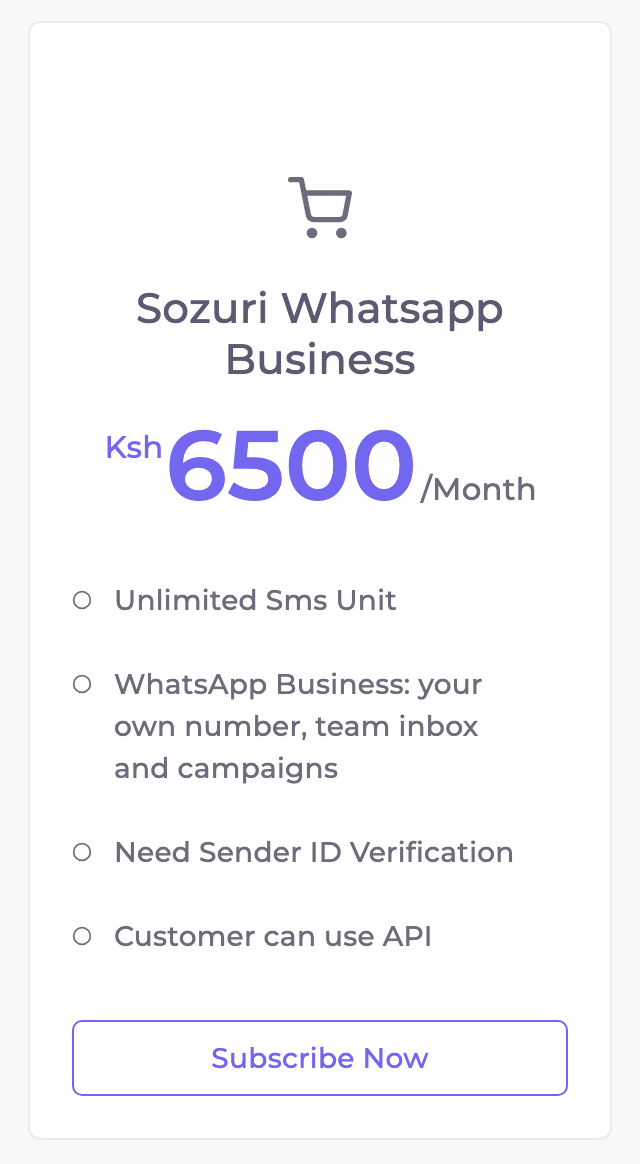
Your account is not yet allowed to change plans by itself. Call 0722 117 850 or email [email protected] and we will move you to the plan.
If your plan ever lapses, WhatsApp sending pauses — including campaigns that are running — until you renew. Nothing is deleted: your conversations, contacts and campaign results are all still there when you come back.
Step 2Prepare WhatsApp in Meta
You are collecting four values from Meta. Keep a notepad open and paste each one there as you go.
| What you need | Where it comes from |
|---|---|
| Phone number IDa long number — not the phone number itself | Your Meta app → WhatsApp → API Setup |
| WhatsApp Business Account IDoften shortened to WABA ID | Your Meta app → WhatsApp → API Setup |
| Permanent access tokenstarts with EA… | Meta Business Settings → Users → System users |
| App secret32 letters and digits | Your Meta app → App settings → Basic |
-
Create a Meta app
developers.facebook.com/apps → Create AppChoose the use case Connect with customers through WhatsApp, then pick your business portfolio (or create one). Meta adds the WhatsApp product to the app for you.
-
Add your business phone number
Your app → WhatsApp → API Setup → Add phone numberEnter the display name customers will see (normally your business name), the number, and confirm it with the code Meta sends by SMS or call.
-
Add a payment method
WhatsApp Manager → Payment methodsMeta needs a card on the WhatsApp Business account before it delivers template messages beyond the free test allowance.
-
Copy the two IDs
Your app → WhatsApp → API SetupPick your number in the From list. The page then shows its Phone number ID and the WhatsApp Business Account ID. Copy both.
The commonest mistakeYour business portfolio ID looks just like the WhatsApp Business Account ID and sits a few lines away in Meta's pages. They are different things. If Sozuri says "That phone number is not in that WhatsApp Business Account", this is almost always why — copy both IDs again from the API Setup page.
-
Create a permanent access token
Business Settings → Users → System users → AddCreate a system user with the Admin role. Choose Assign assets and give it your app (full control) and your WhatsApp Business account (full control). Then choose Generate new token, pick your app, set the expiry to Never, and tick these permissions:
whatsapp_business_messaging
whatsapp_business_management
business_management
Copy the token straight away — Meta shows it only once. Use this system user token, not the 24-hour one on the API Setup page: a temporary token stops working after a day and sending stops with it.
-
Copy the app secret
Your app → App settings → Basic → App secret → ShowMeta signs every message it sends to Sozuri with this secret, and Sozuri checks the signature before trusting anything. Without it you can still send, but make sure it is the secret of this app — see Receive replies.
Meta renames its menus from time to time. If a label here differs from what you see, look for the nearest match on the same page.
Step 3Connect your number
Sozuri → WhatsApp → SetupOpen WhatsApp → Setup. Until a number is connected, the page shows Connect your WhatsApp Business account.
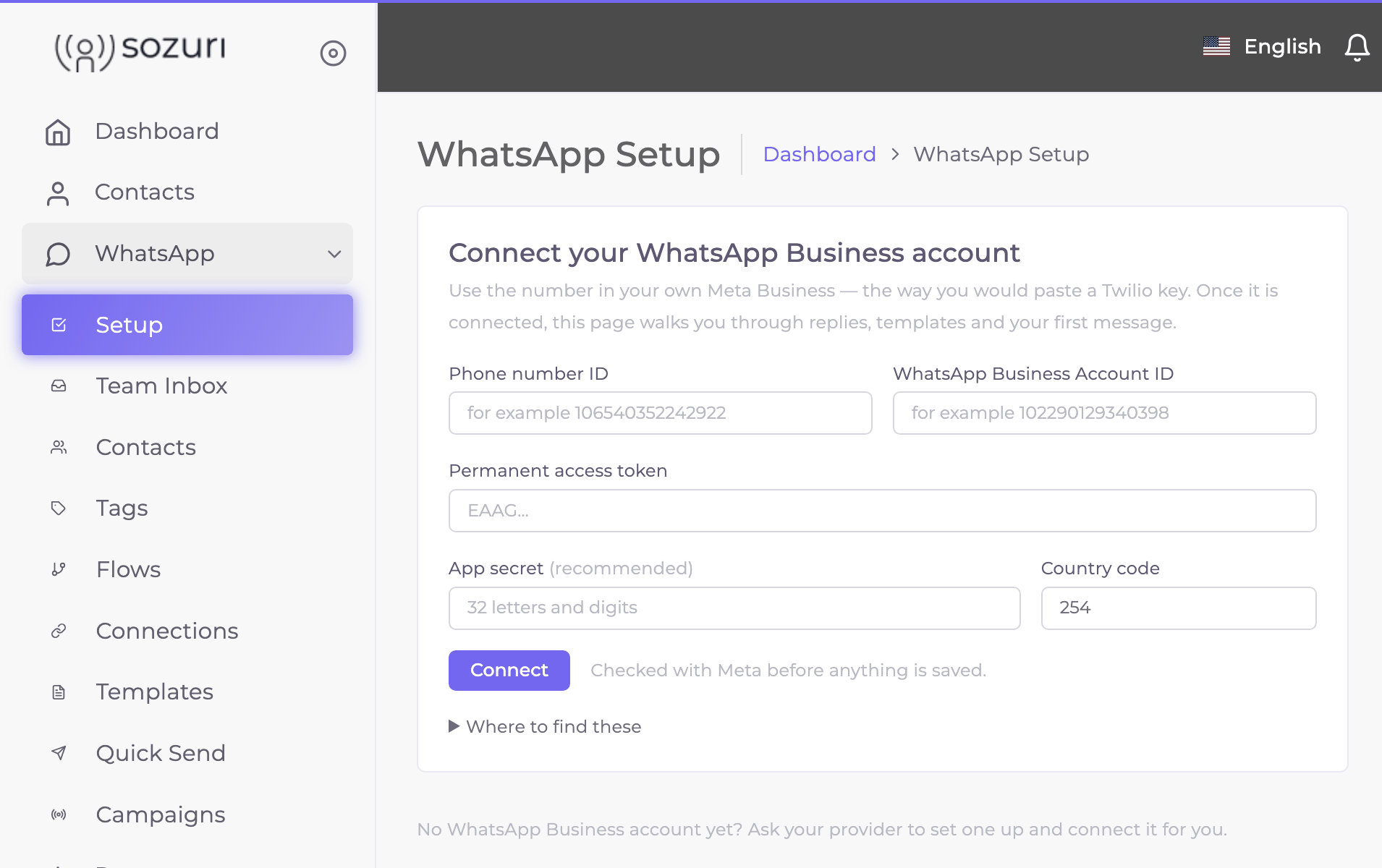
Paste the four values
Phone number ID, WhatsApp Business Account ID, Permanent access token and App secret. Leave Country code at
254for Kenya: it is used for numbers typed without one, such as0712 345 678.Press Connect
Sozuri asks Meta first: does the token work, and is that phone number in that WhatsApp Business account? Nothing is saved until Meta says yes. If something is wrong you see Meta's own reason under the form — the most common ones are in When something is wrong.
Once connected, Setup becomes a checklist that shows what is done and what is next. The token is never shown again, only its last four characters. When you issue a new token in Meta, open Update the connection on the right and paste it — fields you leave empty keep their saved value.
Step 4Receive replies
Sending is one direction. For customers' replies, delivery ticks and read receipts to reach Sozuri, Meta has to know where to send them. This is the step people skip — and without it nobody can reply to you.
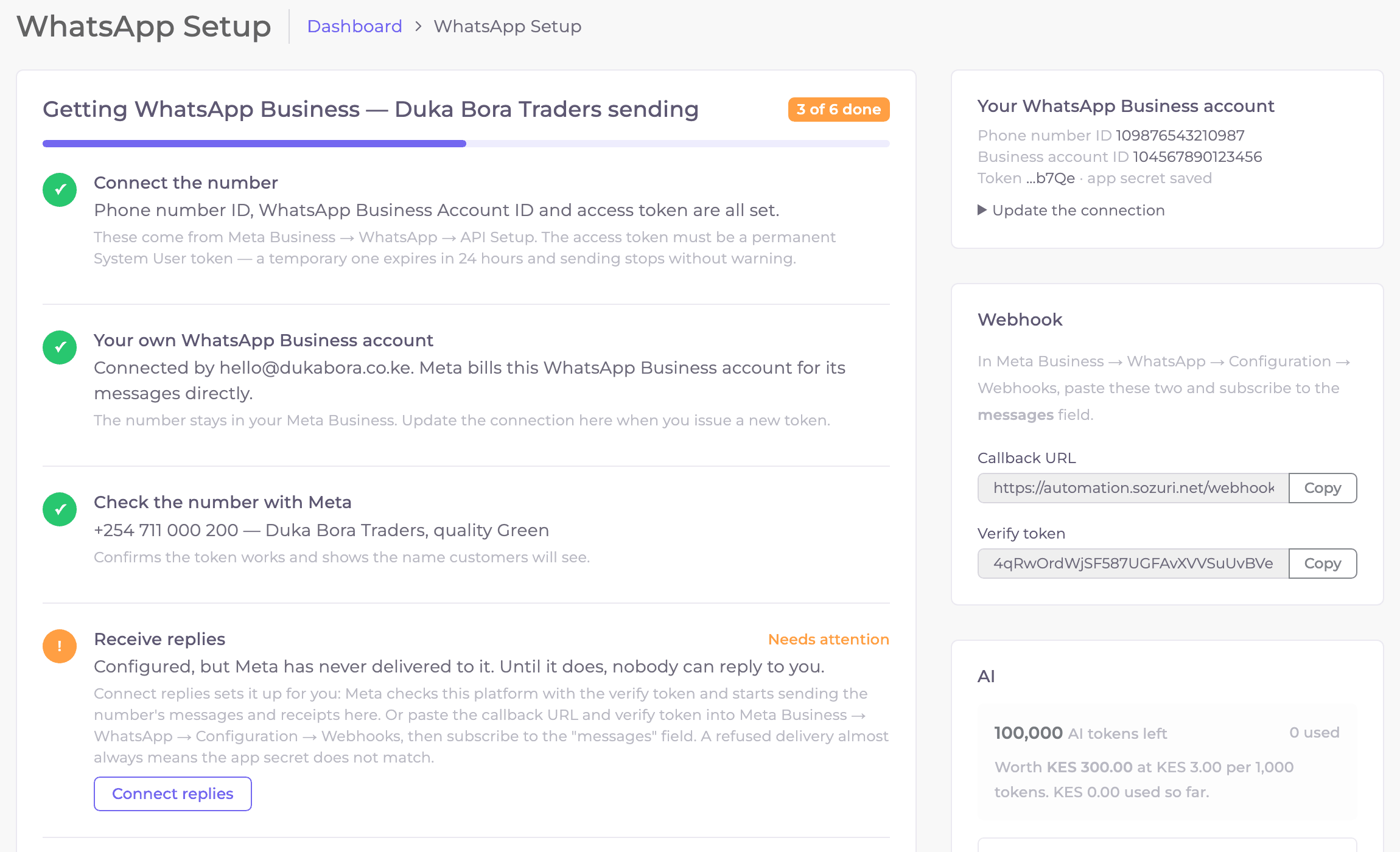
The quick way: Connect replies
Press Connect replies
On the Receive replies step. Sozuri asks Meta to send this number's messages and receipts here; Meta first checks Sozuri with the verify token, so a success means the connection works.
Prove it
From your own phone, send a WhatsApp message to your business number. It appears in WhatsApp → Team Inbox within seconds, and the step turns green with Last delivery … ago.
The manual way
If Meta refuses the quick way, do it in Meta's dashboard instead:
Copy the two values from Sozuri
WhatsApp → Setup → Webhook cardCallback URL and Verify token each have a Copy button.
Paste them into Meta
Your app → WhatsApp → Configuration → Webhook → EditPaste both and choose Verify and save. If it will not save, the two values do not match — copy them again.
Subscribe to messages
On the same page, choose Manage and tick the
messagesfield. Without it, Meta accepts the webhook but sends nothing to it.
If the app secret belongs to a different Meta app, sending still works but every reply is refused, because its signature does not match. The Setup checklist then says "Meta has called the webhook but it was refused: signature mismatch — check the app secret". Copy the secret again from App settings → Basic and paste it under Update the connection.
A WhatsApp number can send its replies to one place at a time. If it is also connected to another chatbot or CRM, connecting replies here moves them to Sozuri.
Step 5Get a template approved
WhatsApp protects people from spam: a business can only start a conversation with a template Meta has approved. Once a customer writes to you, you can answer in your own words for the next 24 hours — no template needed.
WhatsApp → Templates → New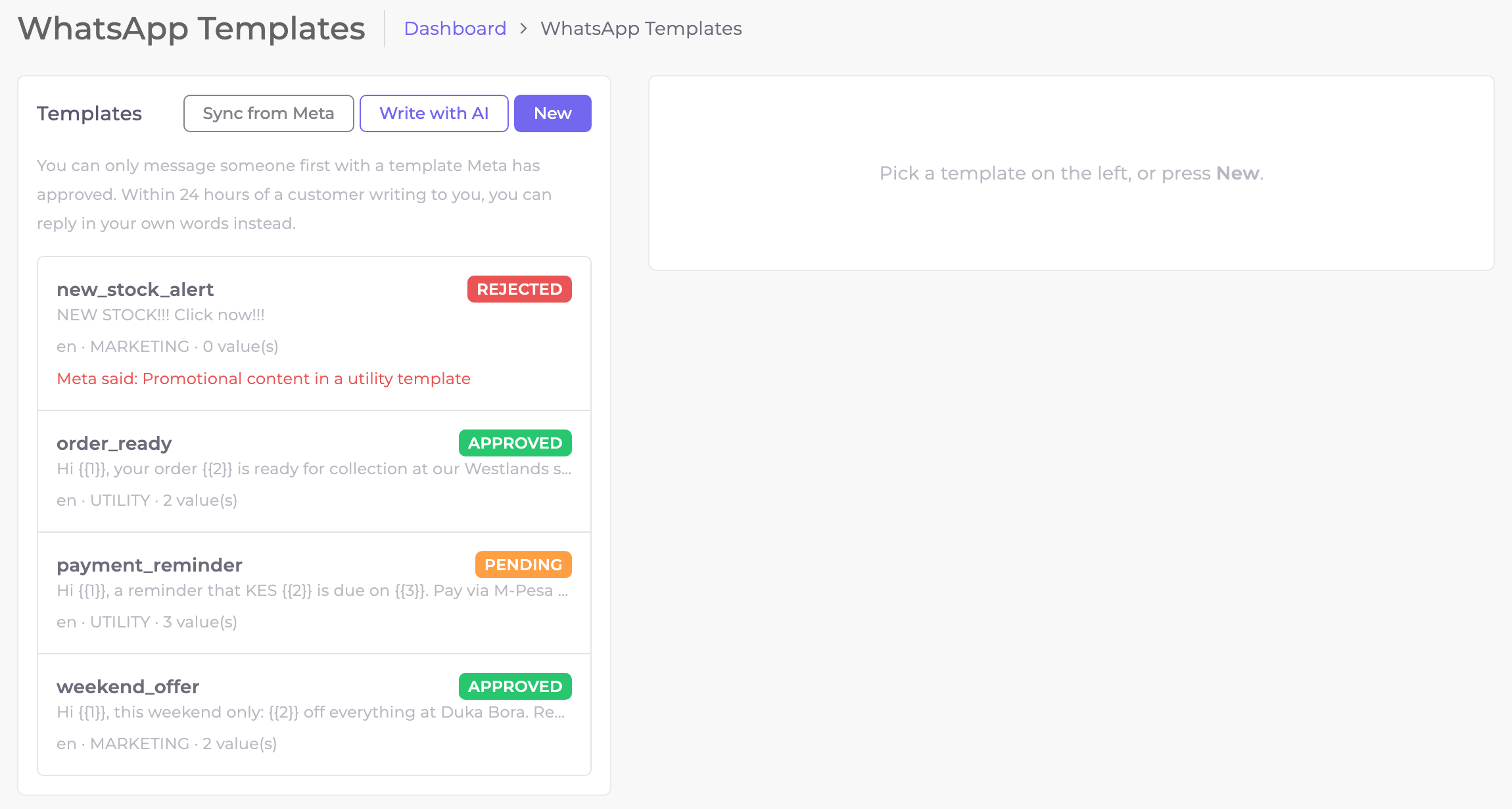
- New writes a template from scratch; Write with AI drafts one from a sentence about what you want to say. On Setup, Write the starter drafts adds ready-made drafts for orders, deliveries, bookings and payments.
- Use
{{1}},{{2}}… where each person's details go — a name, an order number, an amount. You fill them when you send. Put words before the first one and after the last: Meta refuses … due on {{2}}. even with the full stop. - The heading can be words, a photo, a video, a PDF or a map. For a photo, video or PDF, upload a sample: Meta reviews the template with it, and each campaign or message can carry a different one. A map heading takes its place — the pin, name and address — when it is sent.
- Buttons, up to 10: quick replies (the tap comes to the Team Inbox and your flows), a website (its link can end with a value for each customer, like an order number), a phone number to call, and for marketing templates a code to copy, such as an offer code. Keep the quick replies together.
- Pick the right category: Utility for updates about something the customer did (an order, a payment, a booking), Marketing for offers and news, Authentication for one-time codes. A greeting or offer filed as Utility is rejected or moved to Marketing.
- Submit it. Meta usually answers within minutes. Sync from Meta brings in templates you made directly in Meta's WhatsApp Manager.
A rejected template cannot be edited, and Meta holds its name for about 30 days. Read the reason under it (Meta said: …), then write a new one under a different name.
Step 6Send your first message
Send one to your own number first: it proves the token, the template and the replies in one go.
WhatsApp → Quick Send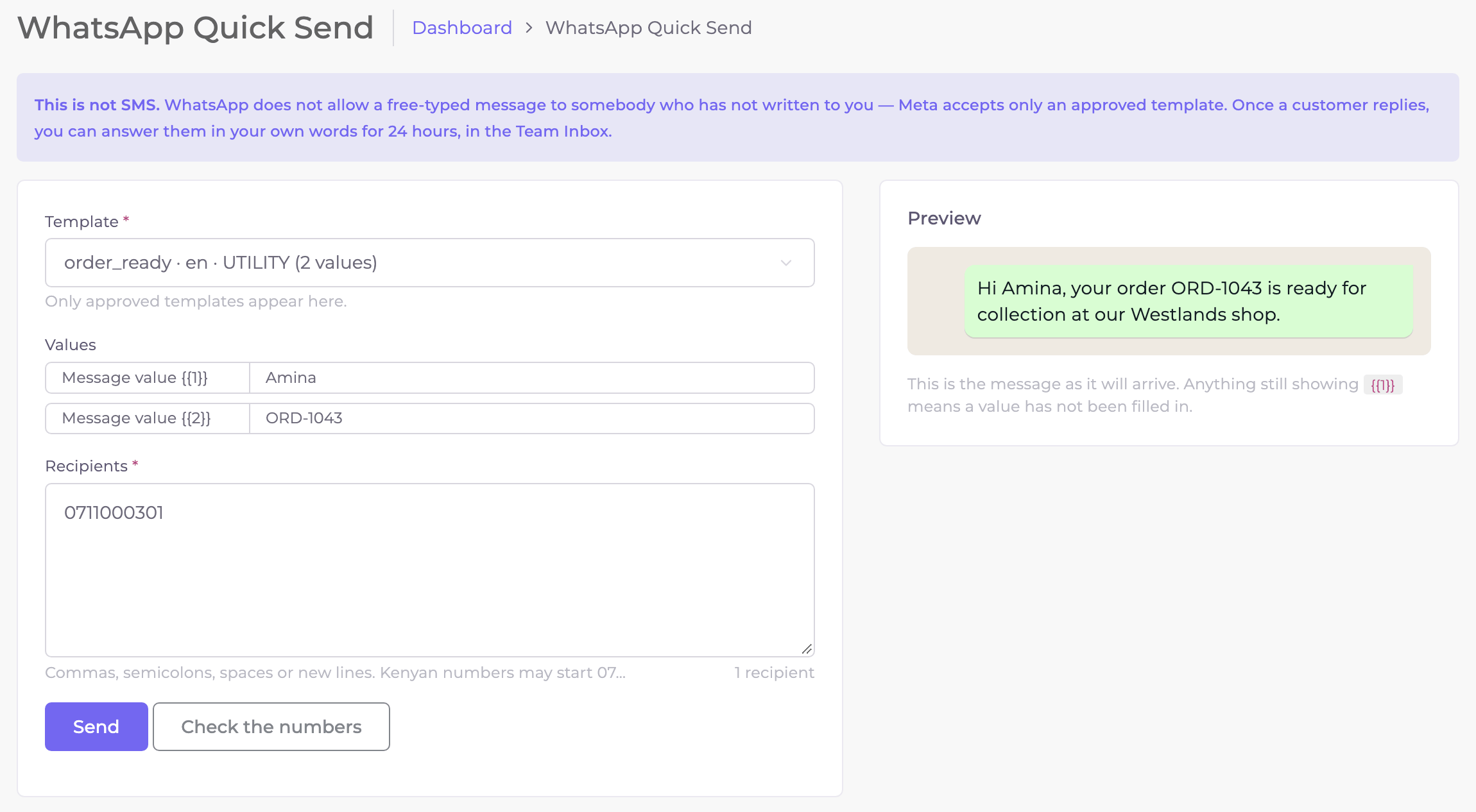
Choose the template and fill its values
Anything still showing
{{1}}in the preview has not been filled in.Type your own number and press Send
Kenyan numbers can start with
07…or01…. Separate several numbers with commas or new lines.Reply from your phone
Your reply lands in the Team Inbox. That is the whole round trip working.
What your customer sees. The examples in this guide use a made-up shop, Duka Bora Traders.
The Team Inbox
Every WhatsApp conversation with your business, in one place, for your whole team.
WhatsApp → Team Inbox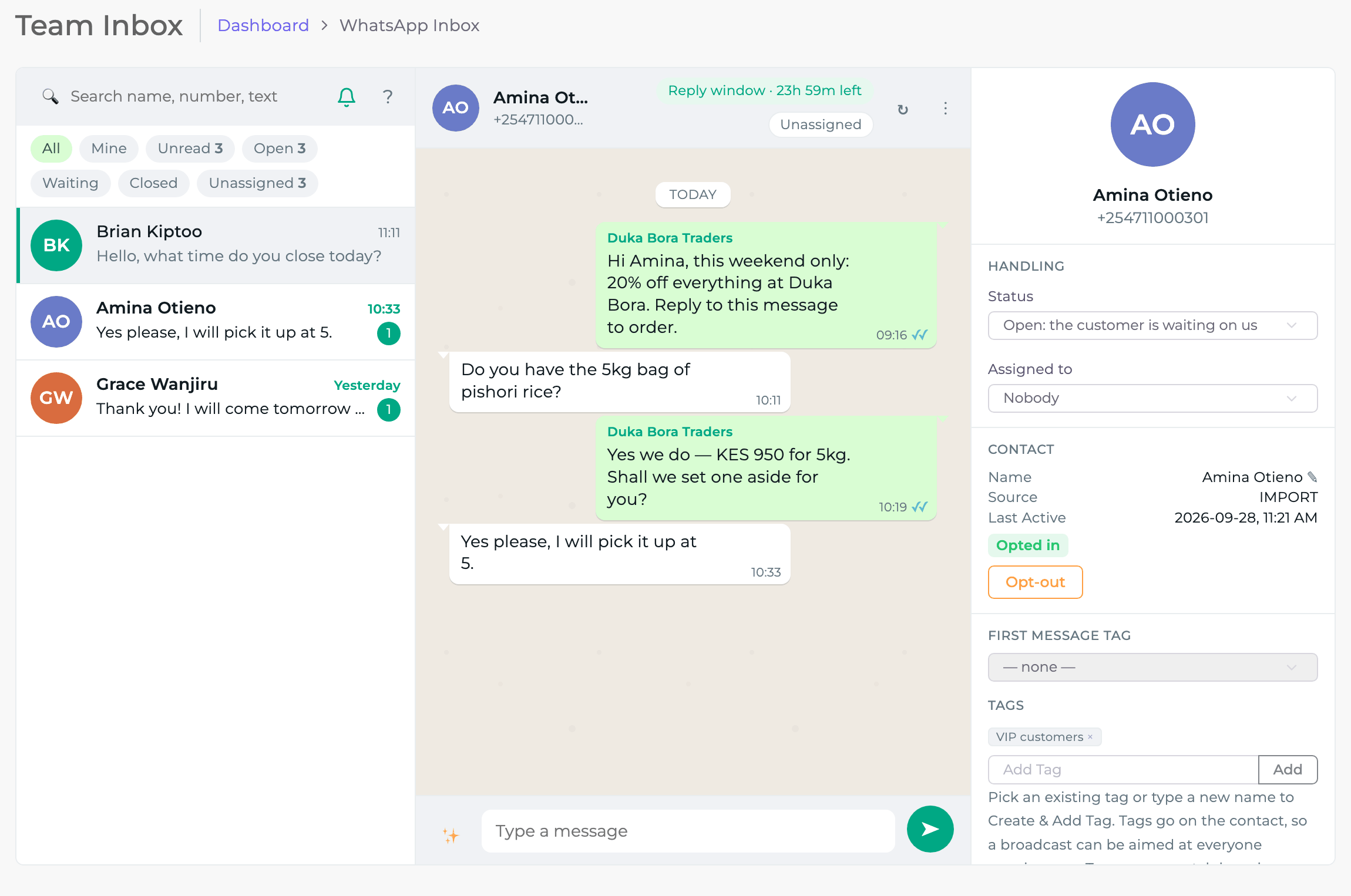
- Filters — All, Mine, Unread, Open, Waiting, Closed, Unassigned — and search by name, number or text.
- Reply window. The countdown at the top (Reply window · 23h 59m left) is how long you may answer in your own words. After it closes, only a template can restart the conversation.
- Assign a conversation to a teammate, set its status, add a note only your team sees, and tag the customer — tags are how you aim a campaign later.
- Opt-out removes the customer from every future campaign until they opt in again.
- Until 30 September 2026 your replies inside the 24-hour window are free. From 1 October 2026 Meta charges each one at its utility rate (see What it costs).
Contacts and tags
Everyone who messages you, and everyone you import, is kept in Contacts → All Contacts with their tags, source and when they were last active. Each person is listed once there; Contacts → Contact Groups shows the same people by the groups they are filed in, the lists SMS campaigns and group broadcasts use.
Contacts → All Contacts → Import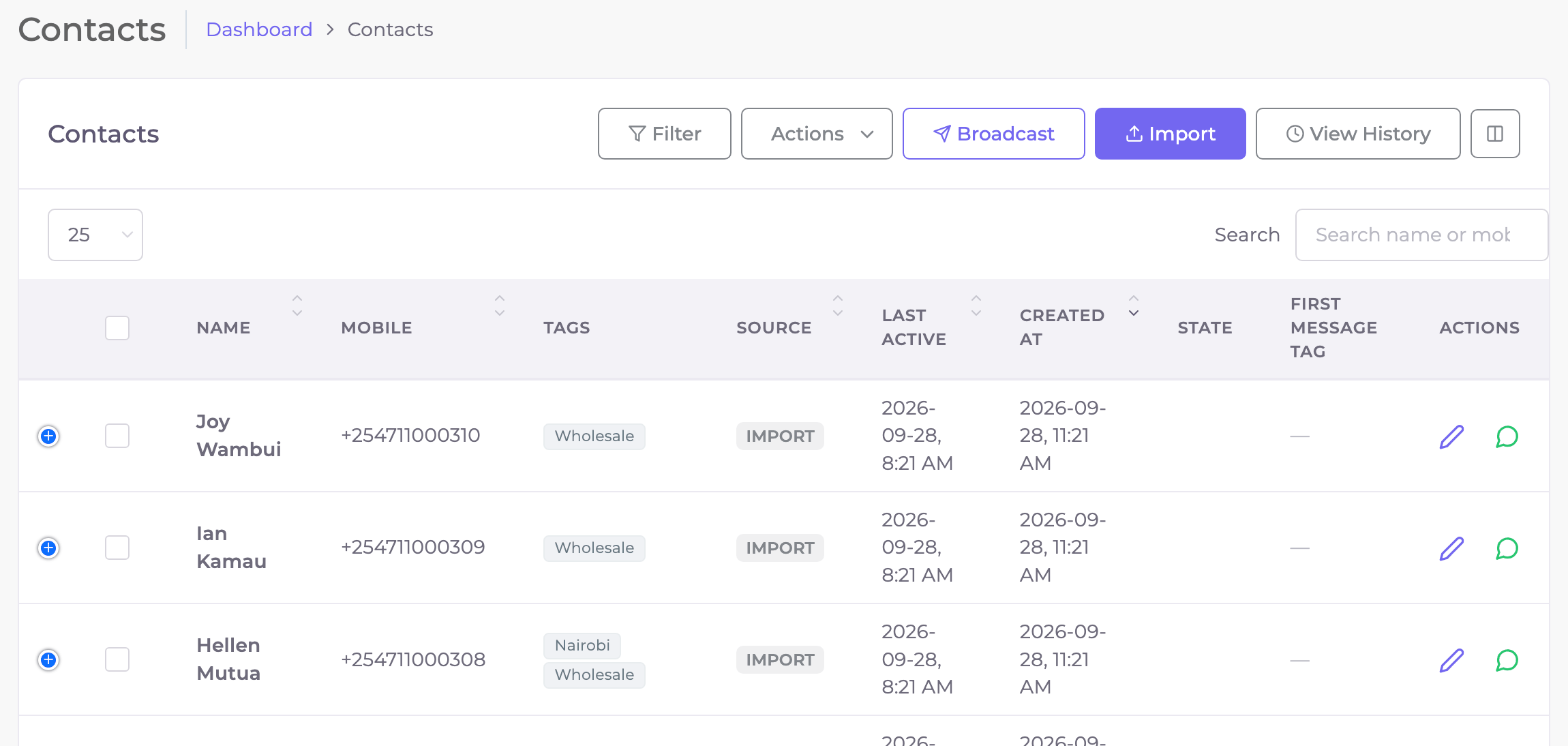
- Import a CSV: upload the file, match its columns to name, mobile and tags, and import. View History shows every import and any rows that failed.
- Tags — like VIP customers or Nairobi — are managed under Contacts → Tags. Add them from the inbox, an import or Actions.
- New customers who message you are added automatically.
Campaigns
A campaign sends one approved template to many people — now or at a time you choose — and tracks each person: sent, delivered, read, replied or failed. It can also send your own message — words, a photo, buttons, a list, a link or a place — to the people who wrote to you in the last 24 hours.
WhatsApp → Campaigns → New broadcast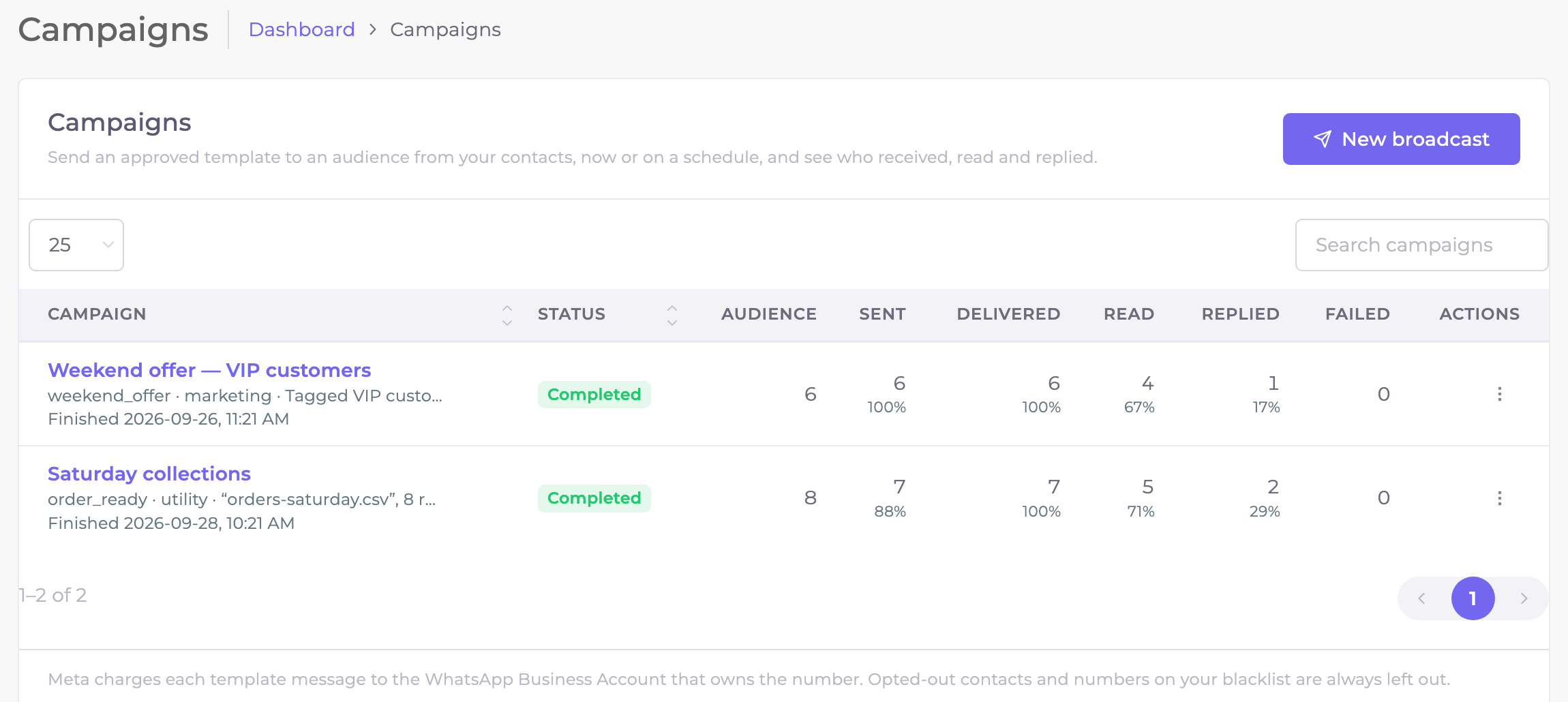
New broadcast, step by step
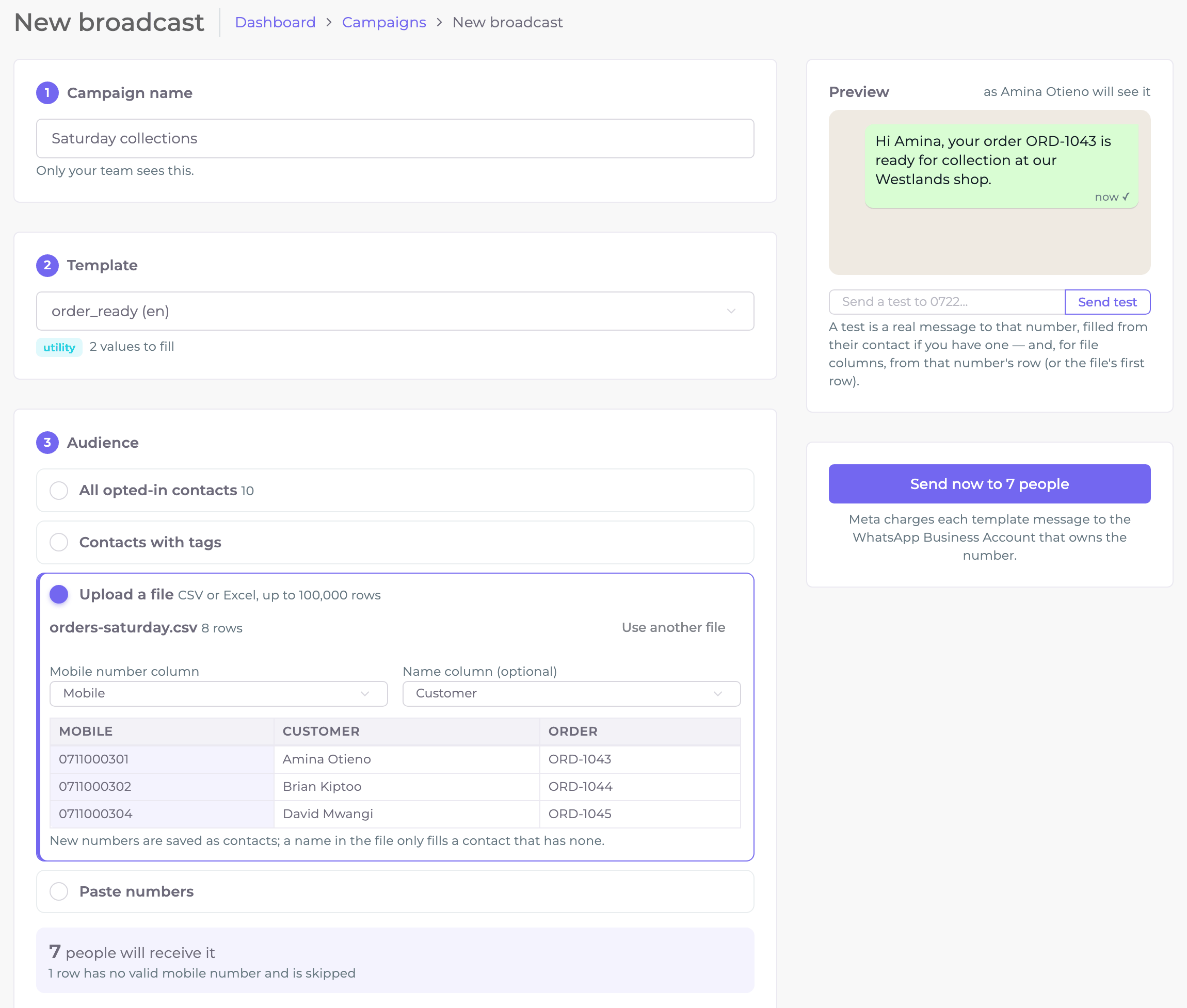
Name it
Only your team sees the name.
Choose what to send
- A template reaches anyone on your list. Marketing templates carry a note: Meta limits how many marketing messages one person receives, so a few may fail with a per-user limit reason.
- Your own message needs no template and no review: words only, a photo, a video, a PDF, up to 3 reply buttons, a list of up to 10 choices, a link button, or a place on the map.
WhatsApp only lets a business send it to someone who wrote in the last 24 hours, so the count shows how many can get it now; everyone else is skipped,
listed as Outside the 24-hour window. Inside that window it costs nothing. Personalise it with
{{first_name}}(or there),{{contact_name}}or{{business}}.
Choose who receives it
- All opted-in contacts.
- Contacts with tags — any of some tags, but not others (for example VIP customers but not Wholesale).
- Upload a file — a CSV or Excel sheet of up to 100,000 rows. Sozuri finds the mobile and name columns by their headings; every other column (an order number, an amount, a due date) can fill a value in the next step. New numbers are saved as contacts.
- Paste numbers — up to 10,000, one per line, optionally with a name.
- From the Contacts page: tick people and press Broadcast. From a finished campaign: Retarget (below).
The count under the audience says how many will receive it, and why anyone is left out — opted out, on your blacklist, or not a valid number.
Personalise
Each
{{n}}comes from fixed text, a contact field (such as first name) or a column of your file. A contact field or file column needs a fallback, used when that value is empty — for example there, so a contact without a name reads Hi there.A template that starts with a photo, video or document needs the file: paste its link, or Upload it and it gets one (one made on the Templates page offers its sample). One that starts with a map needs the place: its pin (or paste its Google Maps link), its name and its address. A coupon button takes the code; a website button the end of its link.
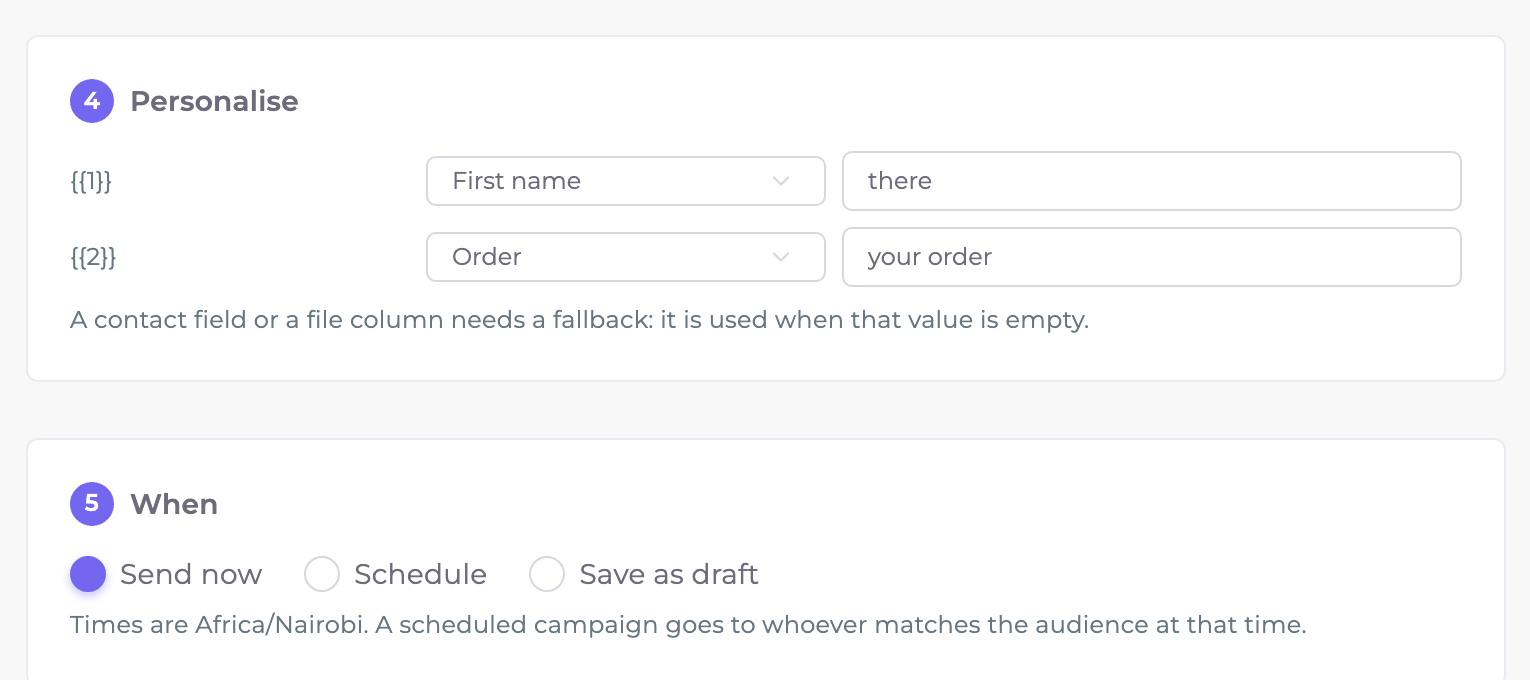
{{1}}is the first name (fallback there);{{2}}is the file's Order column.Send now, schedule or save a draft
A scheduled campaign goes to whoever matches the audience at that time. Messages start within a minute of Send now.
Results
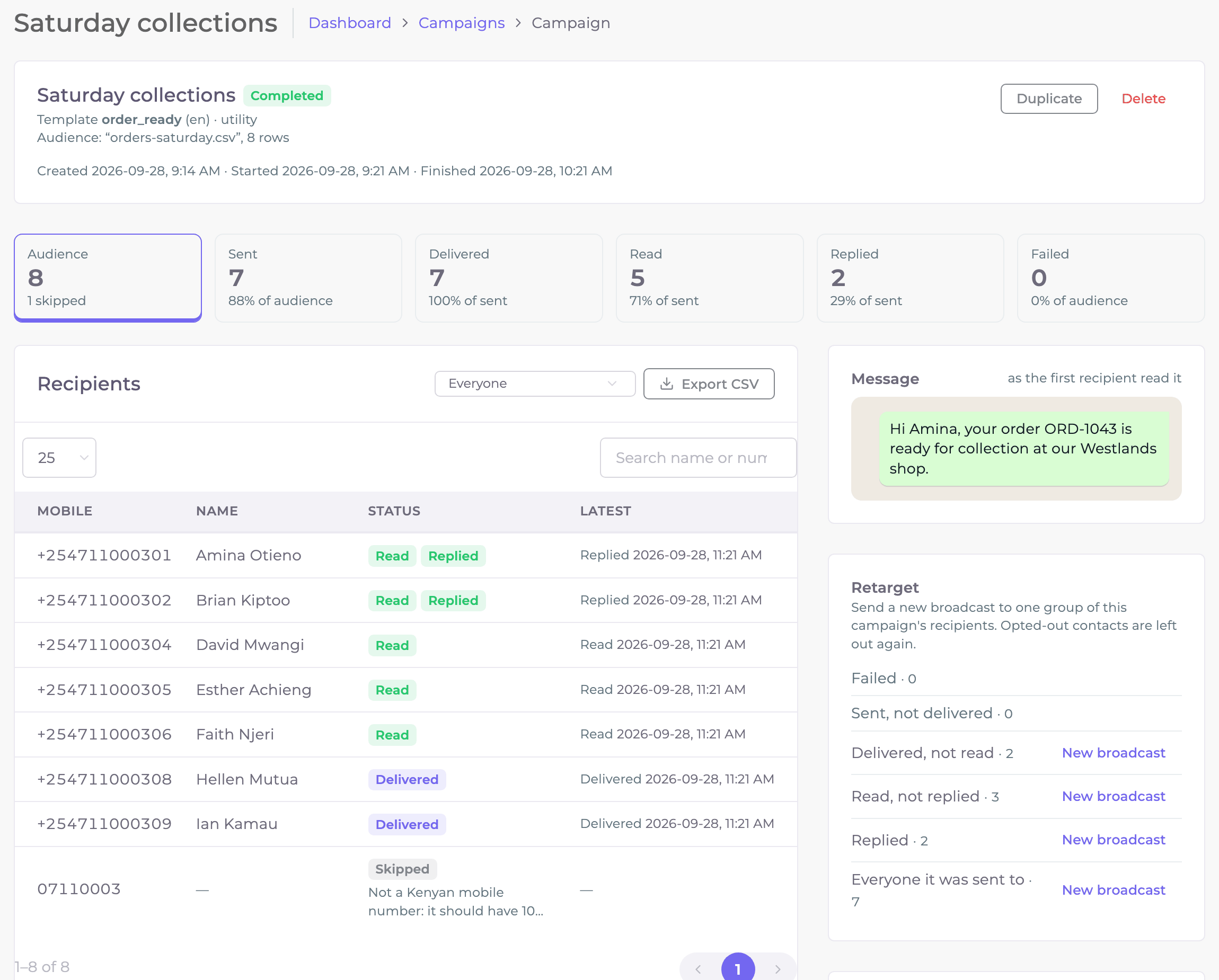
- Pause, Resume or Cancel a campaign while it sends; Duplicate it to send again.
- Export CSV downloads every recipient and what happened to them.
- Retarget starts a new broadcast to one group of this campaign — for example everyone who read it but did not reply.
- Why messages did not go lists each reason and how many people it affected.
Put the numbers in one column with a heading such as Mobile. Kenyan numbers need 10 digits, like 0712 345 678 (or 254712345678).
If Excel shows 2.54712E+11, it has shortened the number: format the column as Text and save the file again.
A number that appears twice gets one message, from its first row.
The WhatsApp Shop
Sell from your WooCommerce store inside WhatsApp. Customers browse your real products as swipeable cards, fill a cart, choose delivery — or just name their town — and pay with a Paystack link or cash on delivery. Every order lands in your store like a website order, and the confirmation arrives on WhatsApp.
Set it up under WhatsApp → Shop. It has its own step-by-step guide, with screenshots: The WhatsApp Shop.
What it costs
| Who charges | For what | How much |
|---|---|---|
| Sozuri | The platform: team inbox, contacts, templates, Quick Send, campaigns, flows, reports, API | KES 6,500 per monthSozuri Whatsapp Business plan |
| Meta | Each marketing template message delivered (offers, news) | about US$0.0225per message to a Kenyan number |
| Meta | Each utility template message delivered (orders, payments, bookings) | about US$0.004per message to a Kenyan number |
| Meta | Your replies within 24 hours of a customer's message | about US$0.004 from 1 October 2026free until 30 September 2026 |
Meta bills your WhatsApp Business account directly, in US dollars, to the card you added. Its rates depend on the category and the country of the person receiving the message, and Meta changes them from time to time. The figures above are what Meta charged for Kenyan numbers in September 2026; Kenya is in Meta's Rest of Africa price group. See Meta's current rates.
From 1 October 2026 Meta charges your replies inside the 24-hour window at the same rate as utility messages, and utility templates sent inside that window are charged too. Meta charges only for messages it delivers, and messages customers send you are never charged.
When something is wrong
Sozuri shows Meta's own reason wherever something fails. The common ones:
| You see | What it means and what to do |
|---|---|
| Meta did not accept these details: Invalid OAuth access token | The token is wrong, expired or missing a permission. Generate a new system user token with the three permissions and expiry Never. |
| That phone number is not in that WhatsApp Business Account | The two IDs come from different places — usually the business portfolio ID was pasted instead of the WhatsApp Business Account ID. Copy both from API Setup. |
| This WhatsApp number is already connected to an account on this platform | Each number can be connected to one Sozuri account. Call 0722 117 850 to have it moved. |
| Receive replies: Configured, but Meta has never delivered to it | Meta is not sending this number's messages to Sozuri yet. Press Connect replies, or follow the manual way in Step 4. |
| …refused: signature mismatch — check the app secret | The app secret belongs to another Meta app. Copy it again from App settings → Basic and paste it under Update the connection. |
| A template is REJECTED | Read the reason under it (Meta said: …), then write a new template under a different name. |
| A campaign is Paused: WhatsApp refused the campaign: … | A problem with the whole account — for example the template was deleted in Meta, or the token stopped working. Fix it, then press Resume: it carries on with whoever has not been sent to. |
| WhatsApp sending is paused. Your subscription… | Your Sozuri plan has lapsed. Renew it and sending continues; paused campaigns can be resumed. |
| Failed 131049 per-user marketing limit | Meta limits how many marketing messages one person receives. The message is not charged; try again later, and use Utility templates for order and payment updates. |
| Failed 131026 Message undeliverable | The number is not on WhatsApp, or its WhatsApp is too old. Nothing to fix on your side. |
| Skipped: Not a Kenyan mobile number or Excel shortened this number | Fix the number in your file (10 digits, like 0712 345 678; format the column as Text in Excel) and send again with Duplicate. |
Call or WhatsApp 0722 117 850 (chat on WhatsApp), or email [email protected]. Say which step you are on and what the page shows — a screenshot of the Setup checklist is the fastest way to help.
For developers: the WhatsApp API
Send WhatsApp messages from your own system — a shop, a CRM, a booking tool, Zapier — hear about messages the moment they arrive, and keep your contacts, Team Inbox, broadcasts and templates in step with it. The API sends from the number you connected in Step 3, with the templates Meta approved in Step 5. Every message it sends appears in the Team Inbox and in your reports like any other.
Your API token
Sozuri → Developers → API Token → Regenerate Token- One token works for both ways of calling the API below. Keep it secret: anyone who has it can send from your number.
- Regenerate Token replaces the old token at once, so update every system that uses it.
- Your plan must include API access. The API takes up to 60 requests a minute.
Two ways to call it
| Style | Address | How to send the token |
|---|---|---|
| REST (recommended) | https://automation.sozuri.net/ | The header Authorization: Bearer YOUR_API_TOKEN, with a JSON body |
| HTTP | https://automation.sozuri.net/ | The header X-API-TOKEN: YOUR_API_TOKEN, or api_token in the body or in the address of a GET request |
Both styles have the same endpoints and give the same answers. Send Accept: application/json. Every answer carries
status (success or error) and message, and a successful one carries data.
Times are ISO 8601 with the time zone, such as 2026-10-02T09:14:05+03:00.
Every list has the same shape — "data": {"templates": [ … ], "has_more": false, "next_cursor": null}, named for what it holds —
and a single thing comes as "data": {"contact": { … }}. Only the answers of /send and /status are flat,
as they have always been.
Postman collections
Every call on this page, ready to run in Postman. Download the one for the style you use:
- In Postman, choose Import and drop the file in.
- Open the collection's Variables tab. Set
api_tokento your token, andtoto your own WhatsApp number, with no spaces. Save. - Set the template variables to approved templates in your account. List templates shows their names and, in
fields, how many values each needs. - Press Send on Send a template. It keeps the message ID, so Check delivery works straight after.
- To try photos, buttons and the other free-form kinds, message your business number from your phone first: they work only inside the 24 hours.
Set
webhook_urlto try webhooks (a test address from webhook.site will do).
The collections come with no phone number and no token, so nothing is sent until you put in your own. The broadcast request goes only to your own number, and the Clean up folder at the end deletes the test webhook and your test contact.
Send a template
curl -X POST "https://automation.sozuri.net/api/v3/whatsapp/send" \
  -H "Authorization: Bearer YOUR_API_TOKEN" \
  -H "Accept: application/json" \
  -H "Content-Type: application/json" \
  -H "Idempotency-Key: order-1043-ready" \
  -d '{"to": "YOUR_NUMBER", "template": "order_ready", "params": ["Amina", "ORD-1043"]}'
Put in your token and, while you test, your own number in place of YOUR_NUMBER. The answer:
{
  "status": "success",
  "message": "Message accepted by WhatsApp",
  "data": {
    "message_id": "wamid.HBgMMjU0NzExMDAwMzAxFQIAERgSNkY5OTU4Q0EwQUJDRTQyRjkA",
    "to": "254711000301",
    "mode": "template",
    "type": "template",
    "template": "order_ready",
    "conversation_id": 1132,
    "body": "Hi Amina, your order ORD-1043 is ready for collection at our Westlands shop.",
    "warnings": []
  }
}
message_id is Meta's own ID for the message (the wamid). Keep it to check delivery later.
body is the message exactly as it was sent, and conversation_id is its conversation in the Team Inbox.
| Field | Needed | What it is |
|---|---|---|
to | Always | The recipient: 0711000301, 254711000301 or +254 711 000 301. A number without a country code gets your account's (254). |
template | Unless you send message or a type | The name of an approved template. |
params | When fields.params is above 0 | The message values {{1}}, {{2}} … in order. The count must match the template. |
headerParams | When fields.headerParams is above 0 | A text heading's value, as a list: ["ORD-1044"]. |
media | When fields.media is true | {"url": "https://…", "filename": "invoice.pdf"}. The link must be public, because Meta downloads it. filename is for documents. |
buttonParams | When fields.buttonParams is above 0 | The value for a button's link, as a list: ["ORD-1045"]. |
language | No | The template's language, like en. Without it, your connection's default language is used. |
message | Instead of template | Your own words. Delivered only if the person wrote to you in the last 24 hours. For photos, buttons, lists and more, see Inside the 24 hours. |
reply_to | No | The id of a message they sent you: yours shows with theirs quoted above it. |
userName | No | The contact's name. It fills a blank name only, so a name your team typed is never replaced. |
tags | No | Up to 20 tag names to put on the contact. A new name creates the tag. |
source, attributes | No | Where the conversation came from, and simple values to keep with it. Both show in the Team Inbox. |
Every number you send to is saved in Contacts → All Contacts with the source API, carrying the tags you sent. A number on your blacklist still gets the message but is not saved.
Which value goes where
Every template in the template list carries fields: how many values go in params,
headerParams and buttonParams, and whether it needs media. header_type says what the heading is.
| The template list says | Send |
|---|---|
"header_type": "TEXT" and fields.headerParams 1 | the heading's value in headerParams |
"header_type": "IMAGE", "VIDEO" or "DOCUMENT", with "media": true | a public link in media.url (and media.filename for a document) |
fields.params 2 | two message values in params, for {{1}} and {{2}} |
"header_type": "LOCATION", with "location": true | the place in header_location: {"latitude", "longitude", "name", "address"} |
fields.buttonParams 1 | the button's value in buttonParams — buttons says which button and what it is: the end of a link, or a code to copy |
{"to": "YOUR_NUMBER", "template": "delivery_update",
 "headerParams": ["ORD-1044"], "params": ["Brian", "ORD-1044"]}

{"to": "YOUR_NUMBER", "template": "new_stock",
 "media": {"url": "https://example.co.ke/stock.jpg"}, "params": ["Esther"]}

{"to": "YOUR_NUMBER", "template": "payment_link",
 "params": ["David"], "buttonParams": ["ORD-1045"]}

{"to": "YOUR_NUMBER", "template": "new_branch",
 "header_location": {"latitude": -1.2610, "longitude": 36.8024, "name": "Sarit Centre shop", "address": "1st floor, Karuna Road"},
 "params": ["Amina"]}
header_type is null for a template with no heading. params in the template list is the total number of values across all the fields, and param_order names them in the order the app shows them.
Sending safely when you retry
If your system — or Zapier — retries a request whose answer it never got, the message could go twice. Give each message its own
Idempotency-Key header (or an idempotency_key field): send the same key again and Sozuri answers with the first answer,
marked Idempotent-Replayed: true, without sending anything. Use something that identifies the message, such as the order number and step.
- A key is remembered for 24 hours, up to 190 characters. It works on
/send, on starting a broadcast and on submitting a template. - The same key with a different request is refused:
422,"error_code": "IDEMPOTENCY_KEY_REUSED". - A repeat while the first is still being sent gets
409IDEMPOTENCY_IN_PROGRESSwith aRetry-Afterheader. Wait and send it again.
Inside the 24 hours: your own words, photos, buttons and more
Once someone writes to you, for 24 hours you can send them anything, not just templates. Outside that window the answer is 409
with "code": "window_closed" and nothing is sent: send an approved template instead.
{"to": "YOUR_NUMBER", "message": "Your rider is five minutes away."}Add type for the other kinds:
type | Send with it |
|---|---|
image, video, document | media.url (a public link) or media.id, and a caption of up to 1,024 characters. A document takes a filename. |
audio, sticker | media.url or media.id, with no caption. |
buttons | text and up to 3 buttons of 20 characters: ["Yes", "No"], or [{"id": "yes", "title": "Yes"}] to choose the ids. Optional header and footer (60 characters). |
list | text, the button that opens the menu, and up to 10 rows (title 24 characters, description 72). For groups of rows, send sections. |
cta_url | text, a button label and the url it opens. |
location | latitude, longitude, and optionally name and address. |
reaction | message_id (theirs) and an emoji; "" takes it off. |
{"to": "YOUR_NUMBER", "type": "image",
 "media": {"url": "https://example.co.ke/serum.jpg"}, "caption": "Vitamin C serum, 30 ml: KES 1,800"}

{"to": "YOUR_NUMBER", "type": "buttons", "text": "Shall we deliver tomorrow morning?",
 "buttons": ["Yes, please", "Another day"]}

{"to": "YOUR_NUMBER", "type": "list", "text": "Where should we deliver?", "button": "Choose an area",
 "rows": [{"id": "westlands", "title": "Westlands", "description": "KES 300, same day"},
          {"id": "pickup", "title": "Pick up at the shop", "description": "Free"}]}

{"to": "YOUR_NUMBER", "type": "location", "latitude": -1.2648, "longitude": 36.8045,
 "name": "Our Westlands shop", "address": "Sarit Centre, Westlands"}
When they tap a button or a row, you hear of it as message.received (and message.button_reply) with the id you gave it —
btn_1, btn_2… or row_1… when you gave none. Anything too long is refused with the limit, never cut short.
List your templates
curl "https://automation.sozuri.net/api/v3/whatsapp/templates" \
  -H "Authorization: Bearer YOUR_API_TOKEN" -H "Accept: application/json"
Only approved templates are listed. Add ?all=1 to include pending and rejected ones, with Meta's reason.
{
  "status": "success",
  "message": "2 templates",
  "data": {
    "templates": [
      {
        "name": "delivery_update",
        "language": "en",
        "category": "UTILITY",
        "status": "APPROVED",
        "body": "Hi {{1}}, your rider is on the way with order {{2}}.",
        "params": 3,
        "param_order": ["Heading value", "Message value {{1}}", "Message value {{2}}"],
        "header_type": "TEXT",
        "fields": {"params": 2, "headerParams": 1, "media": false, "location": false, "buttonParams": 0},
        "buttons": [],
        "rejected_reason": null
      },
      {
        "name": "new_stock",
        "language": "en",
        "category": "MARKETING",
        "status": "APPROVED",
        "body": "Hi {{1}}, new stock has arrived. Reply to order.",
        "params": 2,
        "param_order": ["Heading photo link (https://…)", "Message value {{1}}"],
        "header_type": "IMAGE",
        "fields": {"params": 1, "headerParams": 0, "media": true, "location": false, "buttonParams": 0},
        "buttons": [],
        "rejected_reason": null
      }
    ],
    "has_more": false,
    "next_cursor": null
  }
}
Create a template
Write a template and submit it to Meta in one call. It goes through the same checks as the Templates page, so what Meta usually rejects is refused here first, with the reason.
curl -X POST "https://automation.sozuri.net/api/v3/whatsapp/templates" \
  -H "Authorization: Bearer YOUR_API_TOKEN" \
  -H "Accept: application/json" -H "Content-Type: application/json" \
  -d '{"name": "order_ready_v2", "category": "UTILITY", "language": "en",
       "body": "Hi {{1}}, your order {{2}} is ready for collection.",
       "examples": ["Amina", "ORD-1043"],
       "header": "Order update", "footer": "Reply to this message with any questions.",
"buttons": ["Thanks", {"type": "url", "text": "Track order", "url": "https://example.co.ke/t/{{1}}", "example": "1043"}]}'name: lowercase letters, digits and_.category:UTILITY,MARKETINGorAUTHENTICATION.examples: one sample for each{{n}}in the body — Meta reviews with them. A body may not start or end with a placeholder.headeris text (60 characters, at most one{{1}}with aheader_example), or{"type": "image" | "video" | "document", "url": …}— a public https link to a sample, which Sozuri fetches and hands to Meta for review — or{"type": "location"}for a map heading.buttons: up to 10 — quick replies as plain text;{"type": "url", "text", "url"}with an optional{{1}}at the end of the address (and itsexample);{"type": "phone", "text", "phone": "+254…"}; or, for marketing,{"type": "copy_code", "example": "SAVE20"}. Keep quick replies together.- The answer is
201with"status": "PENDING". Meta decides within minutes, at most 24 hours:template.approvedortemplate.rejectedreaches your webhook, andGET /templates/{name}shows the state (?language=for another language;languageslists the ones it has). - A name you already use is refused with
409TEMPLATE_NAME_TAKEN."draft": truesaves it on the Templates page without submitting it. - With the HTTP style, the address is
/templates/create: a POST to/templatesthere lists your templates, as it always has.
Check delivery
curl "https://automation.sozuri.net/api/v3/whatsapp/status/MESSAGE_ID" \
  -H "Authorization: Bearer YOUR_API_TOKEN" -H "Accept: application/json"
{
"status": "success",
"message": null,
"data": {
"message_id": "wamid.HBgMMjU0NzExMDAwMzAxFQIAERgSNkY5OTU4Q0EwQUJDRTQyRjkA",
"to": "254711000301",
"state": "read",
"status": "Delivered",
"sent_at": "2026-10-02T09:12:41+03:00",
"updated_at": "2026-10-02T09:13:20+03:00",
"read_at": "2026-10-02T09:13:20+03:00"
}
}state is Meta's own word: sent, delivered, read or failed. It moves forward as Meta reports back,
once replies are connected (Step 4). status is the same news in the words of Sozuri's reports.
Rather than asking again and again, let Sozuri tell you: subscribe a webhook to message.status.
Webhooks: events sent to your system
Give Sozuri an https address of yours and it POSTs each event there as it happens: a message in, a delivery receipt, a new contact, a template approved. This is what Zapier's instant triggers use.
curl -X POST "https://automation.sozuri.net/api/v3/whatsapp/webhooks" \
  -H "Authorization: Bearer YOUR_API_TOKEN" \
  -H "Accept: application/json" -H "Content-Type: application/json" \
  -d '{"url": "https://example.co.ke/sozuri-events", "events": ["message.received", "message.failed"]}'
{
"status": "success",
"message": "Webhook created. Keep the secret: it signs every delivery and is not shown again.",
"data": {
"webhook": {
"id": "wh_01k6m2v9d3xq7c8r5t4b2n1m0p",
"url": "https://example.co.ke/sozuri-events",
"events": ["message.received", "message.failed"],
"status": "active",
"secret": "whsec_3f9a…",
"created_at": "2026-10-02T09:00:00+03:00",
"failures": 0
}
}
}"events": "*" subscribes to all of them. Subscribing the same address to the same events again returns the webhook you have; an account can have 25.
The address must be public https — not a private network or this server.
| Event | When |
|---|---|
message.received | A customer sent a message: text, photo, video, voice note, document, location, contact card, reaction, or a tap on a button or list row. |
message.button_reply | A customer tapped a reply button, a list row or a template button. |
message.status | Every receipt for a message you sent. Or subscribe to just message.sent, message.delivered, message.read or message.failed (with WhatsApp's error code and reason). |
contact.created, contact.deleted | A person was added to, or deleted from, the contact book. |
contact.opted_out, contact.opted_in | A contact opted out, or back in. |
contact.tagged, contact.untagged | A tag was put on, or taken off, a contact. The tag carries its id (the one GET /tags gives), name and category. |
template.status_changed | Meta approved, rejected, paused or disabled a template. Or just template.approved / template.rejected. |
conversation.assigned, conversation.closed | A Team Inbox conversation was assigned, unassigned or closed. |
campaign.completed | A broadcast finished sending. Receipts are still arriving then, so delivered and read are often 0 — GET /campaigns/{id} has them as they come in. |
order.placed, order.paid, order.cancelled | An order in your WhatsApp shop was placed (cash on delivery, or waiting for payment), paid, or cancelled — reason says expired, replaced or cancelled. |
flow.event | A customer reached a Tell your integrations step in one of your flows — for example after answering your lead questions.
It hands over what the flow collected: the name you gave that step (say lead_captured), which flow it was, the contact, and their answers in vars.
Use it to put each new lead, booking or application into a sheet or a CRM by itself. |
A webhook gets each event once, under the narrowest name it asked for: subscribed to both message.status and message.failed,
a failure arrives as message.failed. With "*", receipts arrive as message.status and taps as message.received.
GET /webhooks/events lists them all.
GET /webhooks/events/{event}/samples gives the latest of one event as your webhooks received it, newest first (3, or up to 10 with ?limit=).
Until one has been sent it gives an example in exactly the same shape, with "source": "example" instead of "deliveries".
Use it for a Zap's test step, or to see what an event carries before you build on it.
What arrives
POST https://example.co.ke/sozuri-events
Content-Type: application/json
X-Sozuri-Event: message.received
X-Sozuri-Event-Id: evt_01k6m3x0q8f2r7c9d4b5a6e7f8
X-Sozuri-Timestamp: 1791008045
X-Sozuri-Signature: v1=6f1c0e…

{
  "id": "evt_01k6m3x0q8f2r7c9d4b5a6e7f8",
  "event": "message.received",
  "created_at": "2026-10-02T09:14:05+03:00",
  "data": {
    "id": "wamid.HBgMMjU0NzExMDAwMzAxFQIAEhggQTFCMkMzRDRFNUY2QTdCOEM5RDBFMUYyQTNCNEM1RDYA",
    "message_id": "wamid.HBgMMjU0NzExMDAwMzAxFQIAEhggQTFCMkMzRDRFNUY2QTdCOEM5RDBFMUYyQTNCNEM1RDYA",
    "direction": "inbound",
    "conversation_id": 1132,
    "from": "254711000301",
    "to": "254700123456",
    "contact_name": "Amina Otieno",
    "type": "text",
    "text": "Do you deliver to Kilimani?",
    "reply": null, "location": null, "media": null, "reaction": null, "context": null,
    "received_at": "2026-10-02T09:14:04+03:00",
    "created_at": "2026-10-02T09:14:04+03:00"
  }
}- A tap on a button:
"type": "button_reply"and"reply": {"kind": "button", "id": "btn_1", "title": "Yes, please"}(list_replyfor a list row). - A photo, voice note or document:
mediahas itsid,mime_type,caption,filename, and adownload_urlthat gives the file without a token for 7 days. - A location:
locationhaslatitude,longitude,name,addressand amap_url. - A receipt (
message.statusand the others) hasmessage_id,status,to,campaign_idwhen it came from a broadcast,timestamp, and for a failure,errorwith WhatsApp'scode,titleandmessage. - Contact events carry the
contactasGET /contacts/{phone}gives it, and the tag events thetag: itsid,nameandcategory. flow.eventcarriesname(what you called the step),flow, thecontact,conversation_id,vars— every answer the flow saved, under the names the flow gave them, such as{"full_name": "Wanjiru Kamau", "course": "Nursing"}— the step'snoteand the customer'slast_message.GET /webhooks/events/flow.event/samplesshows a whole one.
Check the signature
Every delivery is signed with your webhook's secret: X-Sozuri-Signature is v1= and the hex HMAC-SHA256 of the timestamp, a dot and the raw body.
Check it before you trust the request, and refuse old timestamps so a recorded request cannot be replayed.
// PHP
$body = file_get_contents('php://input');
$ts   = $_SERVER['HTTP_X_SOZURI_TIMESTAMP'] ?? '';
$want = 'v1=' . hash_hmac('sha256', $ts . '.' . $body, 'whsec_YOUR_SECRET');
if (! hash_equals($want, $_SERVER['HTTP_X_SOZURI_SIGNATURE'] ?? '') || abs(time() - (int) $ts) > 300) {
    http_response_code(401);
    exit;
}
$event = json_decode($body, true);   // $event['event'], $event['data']
http_response_code(200);
// Node.js (Express): read the body raw, before any JSON parser
app.post('/sozuri-events', express.raw({ type: 'application/json' }), (req, res) => {
const ts = req.get('X-Sozuri-Timestamp') || '';
const want = 'v1=' + crypto.createHmac('sha256', process.env.SOZURI_SECRET).update(ts + '.' + req.body).digest('hex');
const got = req.get('X-Sozuri-Signature') || '';
const ok = want.length === got.length && crypto.timingSafeEqual(Buffer.from(want), Buffer.from(got));
if (!ok || Math.abs(Date.now() / 1000 - Number(ts)) > 300) return res.sendStatus(401);
const event = JSON.parse(req.body);
res.sendStatus(200);
});Answering, retries and switching off
- Answer with any
2xxwithin 10 seconds. Do slow work after you answer. - Anything else is tried again after 1 minute, 5 minutes, 30 minutes, 2, 6 and 12 hours, then given up. A retry carries the same
X-Sozuri-Event-Id, so you can drop repeats. - Answer
410 Goneand the webhook is switched off at once (Zapier does this when a Zap is turned off). 25 deliveries given up on in a row switch it off too: subscribe again to switch it back on. POST /webhooks/{id}/testsends a signedpingnow, once, and tells you what your address answered. A test is never retried and never counts toward switching the webhook off.GET /webhooks/{id}/deliveriesshows the last deliveries, their tries and the answers.GET /webhookslists yours.DELETE /webhooks/{id}removes one (with the HTTP style,POST /webhooks/{id}/delete).
Lists: messages, contacts and conversations
For filling a system you are connecting, and for tools that check for new things every few minutes. Every list is newest first, with stable ids.
| Call | Filters |
|---|---|
GET /messages | direction (inbound or outbound), since, updated_since, phone, conversation_id, type (text, button_reply, media, location…), status |
GET /messages/{id} | One message, sent or received |
GET /contacts | updated_since, created_since, tag (names, | between them), opted_out, sort=created |
GET /conversations | status (open, pending, closed), assigned_to (a user id or none), phone, since |
GET /orders | Orders from your WhatsApp shop: status (placed, awaiting_payment, paid, cancelled, expired), phone, since, updated_since. Each has its items, delivery (with a Maps link for a pin), payment (with its link while unpaid) and total.
GET /orders/{id} takes the order's id or its store order number. |
curl "https://automation.sozuri.net/api/v3/whatsapp/messages?direction=inbound&since=2026-10-02T08:00:00Z&limit=50" \
  -H "Authorization: Bearer YOUR_API_TOKEN" -H "Accept: application/json"
{
"status": "success",
"message": "50 messages",
"data": {
"messages": [ … ],
"has_more": true,
"next_cursor": "i48211"
}
}limit is 25 unless you ask, at most 100. When has_more is true, send cursor with the next_cursor you got for the next page.
Times can be ISO 8601 (Z for UTC, or an offset such as +03:00 — in an address, write the + as %2B) or unix seconds.
Messages you received: read receipts and files
POST /messages/{id}/readputs blue ticks on their phone and marks it read in the Team Inbox. Send{"typing": true}to show “typing…” too, until you reply or for 25 seconds.GET /media/{media_id}gives the file a customer sent — a photo, voice note or document — with your token. Or use the message'smedia.download_url, which needs no token for 7 days. Fetch files soon: WhatsApp keeps them for a limited time only.
Contacts and tags
The same contact book as Contacts → All Contacts. These calls need the Developers permission on your account.
| Call | What it does |
|---|---|
POST /contacts | Save a contact, or update the one with this number |
GET /contacts/{phone} | Read one contact |
POST /contacts/{phone} | Change their name and attributes (PATCH works too) |
DELETE /contacts/{phone} | Delete them from every group; their chats stay in the Team Inbox. Needs the Delete contact permission. (HTTP: POST /contacts/{phone}/delete) |
POST /contacts/{phone}/tags | Add tags; a new name creates the tag |
POST /contacts/{phone}/tags/remove | Remove tags |
POST /contacts/{phone}/groups | Add them to groups: {"groups": ["VIP customers"]} |
POST /contacts/{phone}/groups/remove | Take them out of groups (never their only group, and never WhatsApp Contacts) |
POST /contacts/{phone}/opt-out | Opt the person out of every campaign |
POST /contacts/{phone}/opt-in | Opt them back in (refused for a number on your blacklist) |
GET /attributes | The fields a contact can carry, such as Company and Email, with their keys |
GET /groups | Your contact groups, with how many people each holds |
GET /tags | Every tag, with its id and how many people carry it |
POST /tags | Create a tag: {"name": "Nairobi", "category": "manual"} |
POST /tags/{name}/rename | Rename it: {"name": "Nairobi CBD"}. Everyone keeps it. A name another tag has is refused with 409. |
DELETE /tags/{name} | Delete it and take it off everyone; the contacts stay. (HTTP: POST /tags/{name}/delete) |
Addresses are relative to the REST or HTTP address above. A contact is named by its phone number, in any form (0712…, +254 712…), or by its id; a tag by its name or its id. Save a contact:
curl -X POST "https://automation.sozuri.net/api/v3/whatsapp/contacts" \
  -H "Authorization: Bearer YOUR_API_TOKEN" \
  -H "Accept: application/json" \
  -H "Content-Type: application/json" \
  -d '{"phone": "YOUR_NUMBER", "name": "Joy Wambui", "tags": ["lead", "website"], "attributes": {"COMPANY": "Wambui Salon"}}'
{
"status": "success",
"message": "Contact created",
"data": {
"created": true,
"contact": {
"id": "01m3wzt2a4ch2ggz6yty7xk8e3",
"phone": "254711000310",
"name": "Joy Wambui",
"opted_in": true,
"status": "subscribe",
"source": "API",
"last_active": null,
"first_message_tag": null,
"tags": [
{"id": "6f1c2a9e-3b7d-4e58-9a21-7c4d0e8b5f13", "name": "lead", "category": "api"},
{"id": "b0d7e3c1-5a48-4f92-8e6b-2c9a1f7d4e05", "name": "website", "category": "api"}
],
"groups": ["WhatsApp Contacts"],
"attributes": {"EMAIL": null, "COMPANY": "Wambui Salon", "ADDRESS": null, "BIRTH_DATE": null, "WEBSITE": null},
"created_at": "2026-10-02T09:20:11+03:00",
"updated_at": "2026-10-02T09:20:11+03:00"
}
}
}- A new contact answers
201with"created": true. An existing one answers200with"created": false.idnever changes. - On
POST /contacts,namefills a blank name only; send"overwrite_name": trueto replace it. OnPOST /contacts/{phone},namereplaces it. attributesare named by key (COMPANY) or label ("Company");""empties one. One the book does not have yet is listed back inignored_attributes, unless you send"create_attributes": true, which adds it. Broadcasts can fill template values from them.- Numbers are accepted in any form; answers always use
254…. Tag names ignore case. Send at most 20 tags at a time; a contact carries at most 100. sourceisAPI,IMPORTorORGANIC(they wrote to you first).last_activeis when they last wrote to you.
Team Inbox
What an agent does by hand, from your system. {id} is a conversation's id — from a webhook, a list or a send — or the customer's phone number.
Each action shows in the conversation's activity as the person whose token made the call.
| Call | What it does |
|---|---|
GET /team | The people a conversation can be given to |
GET /conversations/{id} | One conversation: status, who has it, unread count, last message |
POST /conversations/{id}/assign | {"assigned_to": "[email protected]"} — an email or user id, or "none" to unassign. Fires conversation.assigned. |
POST /conversations/{id}/notes | {"note": "Called back: delivery moved to Friday."} An internal note; the customer never sees it. GET lists them, each with its author — a person, “Joy Wambui (API)” when written through the API, “Shop”, “Flow” or “Automation” — and via. |
POST /conversations/{id}/close | Close it (fires conversation.closed). …/reopen and …/pending, or …/status with {"status": "pending"}. |
Broadcasts
Start a campaign — the same as WhatsApp → Campaigns — and follow it. Needs the campaign builder permission.
curl -X POST "https://automation.sozuri.net/api/v3/whatsapp/campaigns" \
  -H "Authorization: Bearer YOUR_API_TOKEN" \
  -H "Accept: application/json" -H "Content-Type: application/json" \
  -H "Idempotency-Key: october-vip-offer" \
  -d '{"name": "October VIP offer", "template": "vip_offer", "tags": ["vip"],
"params": [{"attribute": "first_name", "fallback": "there"}, "20%"]}'- Who:
tags(andnot_tags),groups,numbers(up to 10,000), or"audience": "all"— one of them. Opted-out and blacklisted numbers are left out. - Each value in
params,header_paramsandbutton_paramsis text, or{"attribute": …, "fallback": …}to take it from each contact:name,first_name,last_name,phone, or any attribute such asCOMPANY. A media heading takesheader_media_url; a map headingheader_location{"latitude", "longitude", "name", "address"}. - Your own message instead of a template: leave out
templateand givetype—text,image,video,document,buttons,list,cta_urlorlocation— with the same fields as /send, for example{"type": "buttons", "text": "Hi {{first_name}}, shall we keep one for you?", "buttons": ["Yes please", "Not now"], "tags": ["vip"]}. It goes only to those who wrote in the last 24 hours (in_windowin the answer says how many, now); the rest are skipped. The campaign shows"kind": "message"and itsmessage. - It starts within a minute.
schedule_at(ISO 8601) sends it later;"draft": truesaves it on the Broadcasts page instead — withschedule_atas well, the draft keeps that time, and launching it (/resume) sends it then, or at once if the time has passed. GET /campaigns/{id}shows where it is — audience, pending, sent, delivered, read, replied, failed — andcampaign.completedfires when it is done.GET /campaignslists them.POST /campaigns/{id}/pause,/resumeand/canceldo what they say.- Always send an
Idempotency-Key: a retried request then never starts a second broadcast.
Connecting Zapier, Make or n8n
- Instant triggers: subscribe the tool's hook address with
POST /webhookswhen a Zap is switched on, and remove it withDELETE /webhooks/{id}when it is switched off. Sozuri also accepts the fieldstarget_url,hookUrlandevent. A hook that answers410is switched off by itself. - Sample data and polling triggers: the lists — newest first, with stable ids and
since. - From the shop and the flows:
order.placedandorder.paidfor a “New order” trigger, andflow.eventfor anything a flow collects — a lead, a booking, an application — sent by its Tell your integrations step. - Actions: send a template, your own words, a photo, buttons or a list; update a contact or its tags; assign, note or close a conversation; start a broadcast.
- Retries: give every action an
Idempotency-Keybuilt from the triggering record, so a retried step never sends twice. On429, wait the seconds inRetry-After. - With the HTTP style, put the token in an
X-API-TOKENheader rather than in the address.
The HTTP style
The same calls under https://automation.sozuri.net/api/http/whatsapp, with the token in an X-API-TOKEN header or as api_token in the body.
In a GET request, everything can go in the address, each value encoded:
curl -G "https://automation.sozuri.net/api/http/whatsapp/send" \
  --data-urlencode "api_token=YOUR_API_TOKEN" \
  --data-urlencode "to=YOUR_NUMBER" \
  --data-urlencode "template=order_ready" \
  --data-urlencode "params[]=Amina" \
  --data-urlencode "params[]=ORD-1043"
A token in an address can end up in logs along the way, so use the header or a POST body where you can.
Moving from AiSensy or another provider
The send call also accepts the field names of the reseller API many businesses are moving from: destination for to,
campaignName for template and templateParams for params, as well as userName, source,
media, tags and attributes. An existing integration usually needs only the new address and token.
Anything that could not be used is listed in warnings, and the message still goes:
"warnings": ["no saved campaign called 'order_ready'; treated it as a template name"]When a call fails
| HTTP | What it means |
|---|---|
| 401 | The token is missing or wrong (Unauthenticated. or That api_token is not valid). Check it; do not retry until you have. |
| 402 | "error_code": "SUBSCRIPTION_API_BLOCKED": your plan does not include API access, or it has lapsed. Renew or change the plan. |
| 403 | The account lacks a permission: Developers for the API itself, Delete contact to delete contacts, the campaign builder for broadcasts. Ask us to switch it on. |
| 404 | No WhatsApp Business number is assigned to this account (connect one on Setup), or no message, contact, conversation, webhook, campaign or template with that id on your account. |
| 409 | window_closed: a free-form message to someone outside the 24-hour window — send a template. Also: a template name you already use (TEMPLATE_NAME_TAKEN),
a request with this Idempotency-Key still being sent (wait for Retry-After), or a broadcast that cannot be paused, resumed or cancelled from where it is. |
| 422 | The request needs fixing, and message says how: needs 2 body parameter(s), 1 supplied, is pending, not approved by Meta,
is not in the catalogue (sync your templates), is not a usable phone number, WhatsApp allows 3 reply buttons at most. With "code": "meta_error", Meta refused it:
meta_code is Meta's number and message its reason, including WhatsApp sending is paused when your plan has lapsed.
IDEMPOTENCY_KEY_REUSED: the same key for a different request. |
| 429 | More than 60 requests in a minute. The Retry-After header (and retry_after in the answer) says how many seconds to wait. |
Words used in this guide
- WhatsApp Business account (WABA)
- Meta's container for your WhatsApp numbers, templates and billing. It lives in your Meta Business portfolio.
- Template
- A message Meta has approved in advance. The only kind of message that can start a conversation.
- Reply window
- The 24 hours after a customer's last message, during which you may answer in your own words. From 1 October 2026 Meta charges these replies at its utility rate.
- Webhook
- An address that is sent events as they happen. Meta sends your replies and delivery receipts to Sozuri's (Connect replies sets it for you); Sozuri can send the same news on to yours (Webhooks).
- Opt-out
- A contact who asked not to receive campaigns. Sozuri always leaves them out until they opt in again.